How Connected Billing Fixes Stock, GST and Checkout Chaos in Indian Retail

 17 Jul 2026
 Reading Time : 6 Minutes
This article explores how connected billing software helps Indian retailers overcome common challenges related to GST compliance, inventory management, and checkout processes. It explains the benefits of integrating billing, stock tracking, and tax calculations into a single system, highlights the impact on operational efficiency, and provides practical guidance for evaluating a connected billing solution that supports business growth and improves the overall retail experience.
Walk into any busy kirana store on a Saturday afternoon and you will see the same scene: three customers waiting, the counter person punching a calculator for GST, a notebook open to track who bought on credit, and a stack of purchase invoices in the back that nobody has entered yet. Nobody designed it this way. It is simply what happens when a retail business grows faster than its processes.
The interesting part is that the slow billing, the stock guessing, and the month-end GST scramble all trace back to one root cause: the three functions run separately when they should run as one. Modern GST billing for retail shops connects invoicing, inventory, and tax data so that a single action at the counter updates all three at once. That is the real payoff of good billing software like myBillBook: one entry at the counter does the work of three, and the numbers stay right without anyone chasing them. Understanding why that connection matters is more useful than any feature checklist, so that is what this article focuses on.
Why Stock, GST and Checkout Are Not Three Separate Problems
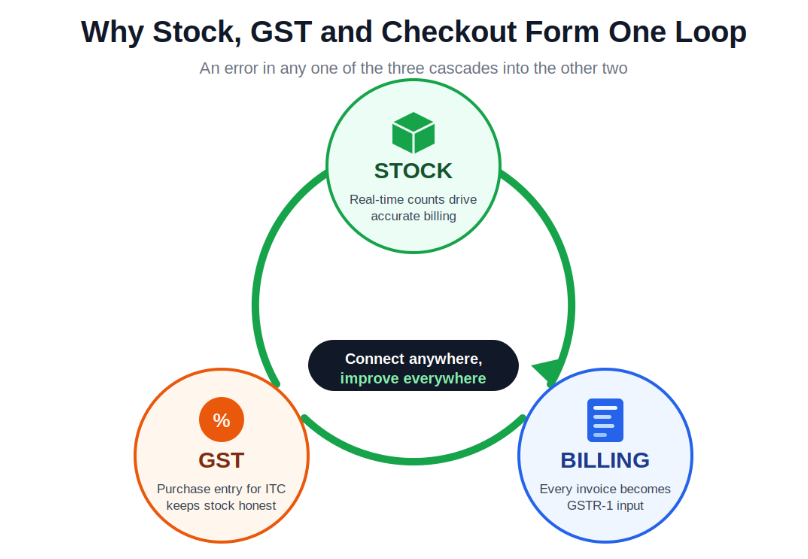
Most advice treats stock management, GST compliance, and fast checkout as independent feature categories. That framing quietly misleads shop owners into fixing one problem while making the other two worse. In practice, the three form a loop.
Stock drives billing accuracy. If inventory is not updated in real time, counter staff bill items that are not actually on the shelf, or waste time searching a register instead of scanning a barcode. Slow checkout is often an inventory problem wearing a billing mask.
Billing drives GST compliance. Every invoice raised, correctly or incorrectly, becomes input to the GSTR-1 return. A wrong HSN code repeated across thirty invoices is not thirty small billing mistakes. It is one compliance failure that a chartered accountant must correct line by line before filing. Compliance happens at the invoice, not at filing time.
GST drives stock discipline. When purchases are entered promptly, which they must be to claim Input Tax Credit, stock counts rise automatically. When goods are stacked first and entered "later", the count falls behind reality, billing works off wrong numbers, and the tax data inherits the error.
Break the loop anywhere and the whole cycle degrades. Connect it anywhere and the whole cycle improves.
The Three Daily Problems a Connected Setup Solves
Slow checkout that quietly loses customers
Manual billing at a busy counter takes two to three minutes per customer. Across a Saturday rush of thirty customers, that is over an hour lost to billing friction alone, and customers who wait too long do not always come back.
The delay has three specific causes. Item lookup is slow without barcode scanning, because someone is typing product names or flipping a catalogue. Tax calculation is manual, so questions like "is this 5% or 12%?" and "same state or interstate?" must be answered correctly under queue pressure, which is exactly where errors are born. And payment recording is a separate end-of-day task, so cash, UPI, and card amounts get reconciled from memory.
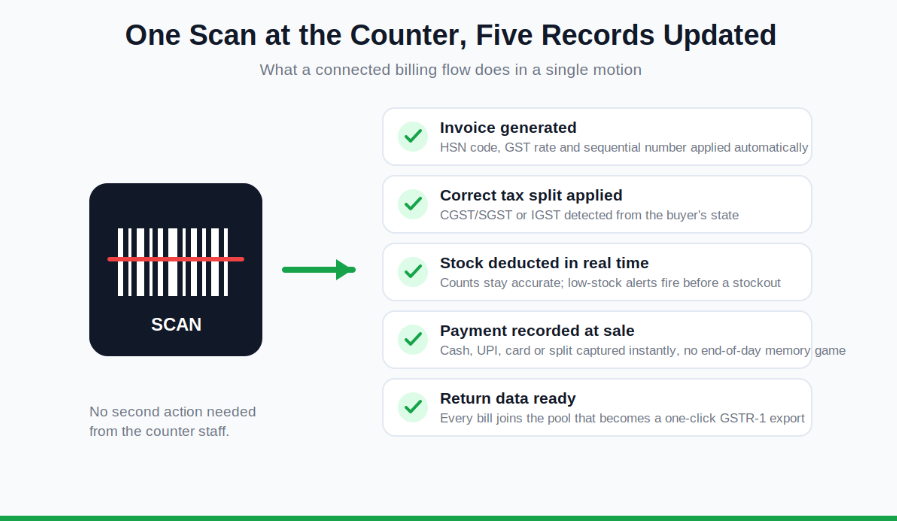
A connected setup, which is what good retail POS software is built to deliver, collapses all three into one motion: a barcode scan fetches the name, price, HSN code, and applicable rate; the CGST/SGST or IGST split follows from the buyer's state; and the payment mode is captured at the moment of sale.
Stock counts that never match the shelf
Ask a shop owner the exact current count of their ten fastest-moving items. Most will offer an estimate. Very few can answer in real time without physically checking. That gap has two expensive consequences. Dead stock, meaning items that have stopped moving, locks up working capital that should be rotating through fast sellers. Stockouts of popular items lose the sale and sometimes the customer in the same moment.
Real-time deduction changes the equation because stock adjusts at the exact point of sale rather than at end-of-day. Low-stock alerts fire before an item runs out instead of after. Reorder decisions rest on actual sales velocity rather than gut feel. And the month-end physical count becomes a confirmation of a number you already know, not a discovery.
GST work that lands on the CA's desk every month
GST itself is not complicated. The framework is clear: defined slabs, two tax types depending on whether the sale is intrastate or interstate, sequential invoice numbering, and monthly returns. What is complicated is executing all of it manually, at volume, without slips. That is a process problem, not a knowledge problem.
Three mistakes dominate in Indian retail. Wrong HSN codes flow straight into an incorrect GSTR-1. Applying CGST/SGST to an interstate buyer produces a non-compliant invoice that fails reconciliation. And gaps in invoice numbering, usually from deleted and redone bills, violate the sequencing requirement and cause IRN generation failures for businesses under the e-invoice mandate.
When HSN codes are configured once per product, the correct rate applies automatically on every bill. When the buyer's state determines the tax type, the split is never guessed. When numbering is automatic, it is gapless by construction. The month-end return becomes an export of data that was already correct at the source.
How to Evaluate a Billing Setup Before Committing
Feature lists all read the same, so test workflows instead. Run a counter test yourself, not through the salesperson: pick five products from your own catalogue, create a full GST invoice for an out-of-state buyer, record a split payment of cash and UPI, and share the bill to WhatsApp. If the whole sequence takes under two minutes, it will survive a real rush hour. Shop owners who bill from a phone at the counter can run the same test on a mobile bill generator and see whether the scan-to-WhatsApp sequence holds up under a queue.
Then verify the connections this article has been describing. Check an item's stock count, generate a test bill, and check again immediately; the count should change with no separate action. Ask for a live GSTR-1 export and confirm it produces a JSON file that uploads directly to the GST portal, because a PDF is a report, not a return. Finally, if your shop extends credit, confirm that customer-wise udhaar balances update from the billing screen itself, since credit tracking buried in a reports menu ends up back in the notebook.
The Real Payoff Is Time
Surveys of Indian SMEs consistently find that retailers moving from manual processes to connected billing recover one to two hours a day previously lost to reconciliation and duplicate entry. That time does not disappear into leisure. It goes into calling suppliers, planning reorders, and serving more customers, which is the work that actually grows a shop.
The chaos at a busy retail counter is not a discipline problem or a staffing problem. It is what disconnected processes look like under load. Connect stock, invoicing, and tax data at the point of sale, and the Saturday afternoon rush stops being something the business survives and becomes something it is built for.




Subscribe & get all related Blog notification.




Post your comment