Managing Multiple Client Accounts: How Modern Agencies Are Solving the Browser Chaos Problem

 27 Nov 2025
 Reading Time : 9 Minutes
Digital agencies can quickly get into trouble with their browsers when they have to manage more than one client account. This article looks at how modern organizations are adopting browser workspace solutions to speed up work, make it safer, and cut down on lost productivity. Agencies may work more efficiently, lower security concerns, and grow their businesses more effectively by giving each customer their own profile.

Digital agencies face a peculiar problem - how to manage multiple clients. Landing new clients should feel like a victory, but instead, it often triggers an internal groan: "Great... another five passwords to manage."
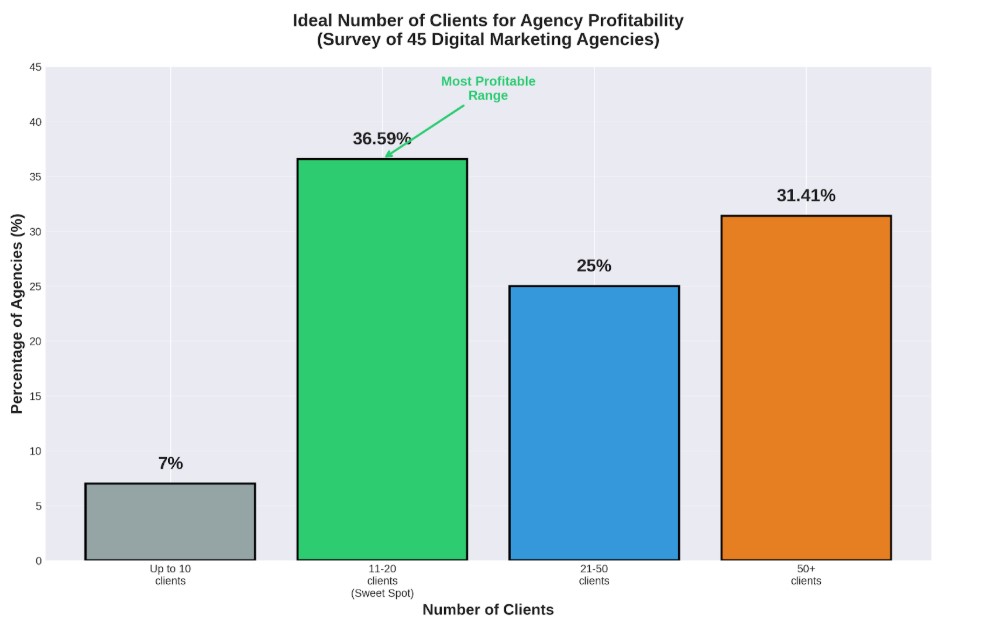
The numbers tell the story. Recent research from Databox reveals that agencies managing 11 to 20 clients hit the profitability sweet spot. However, simple math exposes the chaos lurking beneath these impressive client rosters.
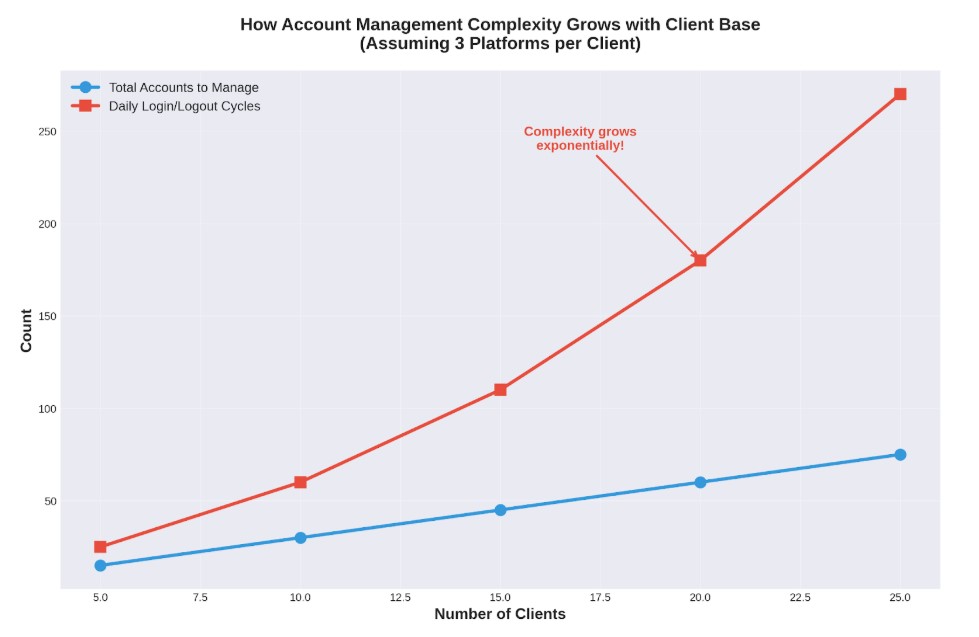
Twenty clients, each requiring access to Facebook, Instagram, LinkedIn, and Google Ads accounts, translates to 60 different logins minimum. Factor in e-commerce dashboards, email platforms, and analytics tools, and that number easily doubles or triples.
This isn't a minor inconvenience. Multiple account management represents a massive productivity drain and a serious security vulnerability. The agencies scaling successfully aren't working harder—they're rethinking the most basic tool in their arsenal: the web browser itself.
Most agencies haven't questioned their approach to managing multiple social media accounts. The status quo involves password managers, shared spreadsheets, and perhaps different browsers for different clients.
Some agencies even permit employees to use personal devices—a security disaster waiting to happen.
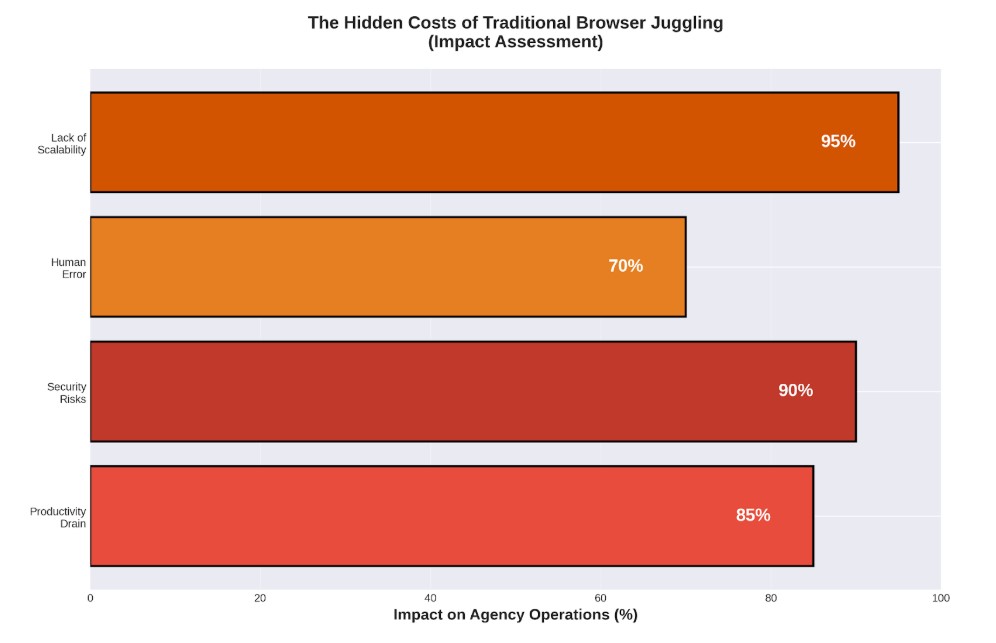
The Hidden Costs of Browser Juggling
The traditional approach to handling multiple accounts creates costs that compound daily. What seems manageable with five clients becomes untenable with fifteen.
Productivity Hemorrhaging
Teams waste hours every week logging in, logging out, and navigating two-factor authentication across dozens of accounts. This constant context-switching destroys deep work and introduces friction into every task. What should take minutes stretches into hours as team members hunt for credentials, reset passwords, and verify their identities repeatedly.
Security Vulnerabilities Multiplying
Shared spreadsheets containing client passwords represent a single point of failure. One successful phishing attack or one disgruntled employee can compromise every client account simultaneously. The consequences extend beyond immediate data breaches.
Platforms like Facebook and Google employ sophisticated tracking through browser fingerprinting—unique identifiers that reveal device characteristics. Multiple logins from identical browser fingerprints trigger security alerts, resulting in locked accounts and frantic client calls during critical campaign launches.
Human Error Compounding
Accidentally posting Client A's content to Client B's social media account represents a common yet devastating mistake. When team members constantly switch between profiles within the same browser environment, these errors become inevitable rather than exceptional. Such mistakes erode client trust and damage agency reputations in ways that discount pricing cannot repair.
Scalability Hitting Walls
The manual approach collapses under its own weight. Adding clients and team members creates exponential rather than linear complexity. Successful modern agencies cannot build sustainable operations on foundations of shared passwords and improvised workflows.
How to Manage Multiple Clients With Professional Browser Workspaces: The Infrastructure Solution
Similar to how Slack revolutionized team communication and Asana brought structure to project management, specialized tools have emerged to solve the browser chaos problem. Professional browser workspace management platforms represent the next evolution in agency infrastructure.
These platforms enable agencies to create separate, isolated browser profiles for each client or project. Each profile functions as a dedicated virtual computer with unique cookies, cache, and browser fingerprints. Teams can maintain simultaneous logins to 20 different Facebook accounts from a single physical device without overlap or security flags.
Security Through Isolation
Profile isolation eliminates cross-contamination risks entirely. Client data remains compartmentalized, and team members receive access to specific profiles without password sharing. This approach represents a quantum leap beyond shared spreadsheet methodologies.
Productivity Through Streamlining
Single-click account switching transforms workflows. Teams eliminate repetitive login cycles and 2FA friction, maintaining focus on actual work rather than access management. This concentration produces higher efficiency and superior output quality.
Collaboration Through Structure
Modern workspace platforms build team functionality into their core architecture. Agencies assign specific profiles to team members, manage granular access permissions, and track activity for accountability. This centralization provides secure management of agencies' most valuable assets—client accounts themselves.
Growth Through Scalability
These platforms scale seamlessly. Adding new client profiles and team members requires minimal friction, creating organized systems that grow alongside business operations rather than constraining them.
Several solutions lead this category, including Multilogin, a platform designed specifically for secure multi-account management. It provides centralized systems for creating and managing isolated browser profiles, helping agencies streamline workflows, strengthen security, and enhance team collaboration.
How Top Agencies Structure Their Operations
Understanding the theory behind browser workspace management differs significantly from implementing it effectively. Top-performing agencies follow specific patterns when structuring their multi-account operations—patterns that maximize efficiency while maintaining security.
Client Profile Architecture
Successful agencies don't simply create random profiles as needs arise. Instead, they implement systematic naming conventions and organizational hierarchies. A typical structure includes:
-
Client-based organization: Each client receives a dedicated folder containing all their platform profiles. For a client named "TechStartup Inc.," the agency maintains separate profiles for TechStartup_Facebook, TechStartup_Instagram, TechStartup_GoogleAds, and TechStartup_LinkedIn. This naming convention prevents confusion during rapid switching and makes team handoffs seamless.
-
Campaign-specific profiles: For clients running multiple campaigns simultaneously, agencies create additional profile layers. A B2C campaign targeting young professionals operates from different profiles than a B2B campaign targeting enterprise decision-makers, even when both campaigns use the same platform. This separation enables precise tracking and prevents campaign interference.
-
Geographic segmentation: Agencies managing international clients establish location-specific profiles. A profile managing European audiences uses appropriate geolocation settings, language preferences, and regional payment methods, while profiles targeting North American audiences maintain different configurations. This geographic precision prevents platform flags triggered by suspicious location inconsistencies.
Team Permission Strategies
Profile access management separates competent agencies from exceptional ones. Rather than granting universal access, strategic agencies implement tiered permission systems.
-
Role-based access control ensures junior team members access only the profiles relevant to their responsibilities. A content creator working on social media posts receives access to social platform profiles but not to advertising accounts containing budget information. Meanwhile, account managers maintain comprehensive access across all client profiles, and executives hold administrative privileges for oversight without daily operational involvement.
-
Time-limited access becomes crucial for freelancers and contractors. When agencies hire specialists for specific projects, they grant temporary profile access that automatically expires upon project completion. This approach eliminates the security risks associated with manually revoking access after contract periods end.
-
Activity logging and auditing provides accountability that spreadsheet-based systems cannot match. Agencies track which team member accessed which profile, when they logged in, what actions they performed, and how long they maintained access. This granular visibility proves invaluable during client disputes or when investigating suspicious account activity.
Workflow Automation Integration
Advanced agencies extend browser workspace platforms beyond simple account switching. They integrate these tools into broader automation workflows that multiply productivity gains.
-
Scheduled profile activation allows agencies to automate routine tasks. Profiles automatically launch at specific times, navigate to designated dashboards, and position windows for optimal monitoring. An agency managing West Coast clients configures profiles to activate at 6 AM Pacific Time, while East Coast client profiles launch three hours earlier. Team members arrive to find their workspaces already prepared.
-
Template-based profile creation accelerates onboarding dramatically. When agencies acquire new clients, they don't build profiles from scratch. Instead, they deploy pre-configured templates containing standard security settings, preferred extensions, bookmarked tools, and platform-specific configurations. What previously required hours of setup now takes minutes.
-
Bulk operations and batch management enable agencies to update multiple profiles simultaneously. When a security update requires password changes across all Facebook profiles, agencies execute bulk updates rather than manually accessing each profile individually. Similarly, proxy rotations, cookie clearances, and fingerprint updates happen across entire profile groups with single commands.
Crisis Management Protocols
Despite best efforts, account issues arise. Platform algorithm changes trigger unexpected flags. Clients accidentally share credentials outside agency systems. Team members inadvertently violate platform policies. Prepared agencies maintain response protocols specifically designed for browser workspace environments.
-
Profile quarantine procedures isolate potentially compromised profiles immediately. When suspicious activity appears, agencies move affected profiles into restricted access zones, preventing further damage while investigations proceed. This containment strategy protects other client accounts from guilt-by-association when platforms detect policy violations.
-
Backup profile systems provide continuity during emergencies. Agencies maintain dormant backup profiles for critical client accounts, kept warm through periodic minimal activity. When primary profiles face sudden suspension, agencies activate backup profiles within minutes, preventing client service disruptions during appeal processes.
-
Rapid profile reconstruction capabilities ensure agencies can rebuild from scratch if necessary. Regular profile configuration exports enable agencies to recreate entire setups quickly, complete with bookmarks, extensions, settings, and automation scripts. This disaster recovery planning transforms potentially catastrophic incidents into manageable inconveniences.
Selecting the Right Workspace Management Platform
Browser workspace platforms vary significantly in capabilities and focus. Agencies evaluating options should consider several critical factors.
Team Collaboration Capabilities
Does the platform facilitate profile sharing, permission management, and activity tracking? Essential features include role-based access control and team-optimized workflows that support collaborative operations.
Security and Reliability Standards
How does the platform maintain profile security and isolation? Understanding what an antidetect browser actually does helps agencies evaluate whether security features meet professional standards. Reviews from similar agencies provide valuable reliability insights.
Interface Usability
Workspace management tools should simplify operations, not complicate them. Platforms with intuitive interfaces enable rapid team adoption without extensive training overhead.
Support Quality
When managing client accounts, responsive support becomes non-negotiable. Customer reviews reveal whether support teams deliver help when agencies need it most—during client emergencies.
Pricing Flexibility
Scalable pricing plans that adjust to profile counts and team sizes prevent platforms from becoming growth bottlenecks. Agencies need solutions that accommodate expansion without forcing expensive tier jumps.
Choosing appropriate tools establishes secure, efficient foundations for agency growth trajectories.
The Future Belongs to Organized Operations
Agencies attempting to scale with spreadsheets and shared passwords face increasing disadvantages. Digital complexity accelerates continuously, and according to HubSpot's 2025 Marketing Statistics, 75% of marketers identify AI-enabled tools as crucial for success. Agencies embracing smarter, more efficient operational methods will dominate their markets.
Adopting professional browser workspace management platforms transcends simple tool additions to tech stacks. This shift fundamentally transforms team operations, creating secure, organized, and scalable environments where teams deliver their best work without outdated process friction.
Moving beyond browser juggling chaos toward structured approaches frees teams to focus on their core competency: delivering exceptional results for clients. The future of agency work emphasizes working smarter, not harder. This transformation begins with bringing order to the browser.
Ready to transform your agency's operations? Whether managing multiple Facebook accounts for clients or juggling campaigns across platforms, professional browser workspace solutions streamline client account management while maintaining team productivity and data security. Starting at just €5.85/month, agencies can implement enterprise-grade infrastructure that scales with their growth.
The agencies winning tomorrow's battles are building better systems today. Browser chaos remains optional—organization is the competitive advantage.




Subscribe & get all related Blog notification.



Post your comment