 Write a Review
Get Demo
XFCut Pro is a professional vinyl cutting plug-in software created specifically for Adobe Illustrator. It allows sign makers to create original graphic design in Illustrator and direct sends them to the cutting plotter.
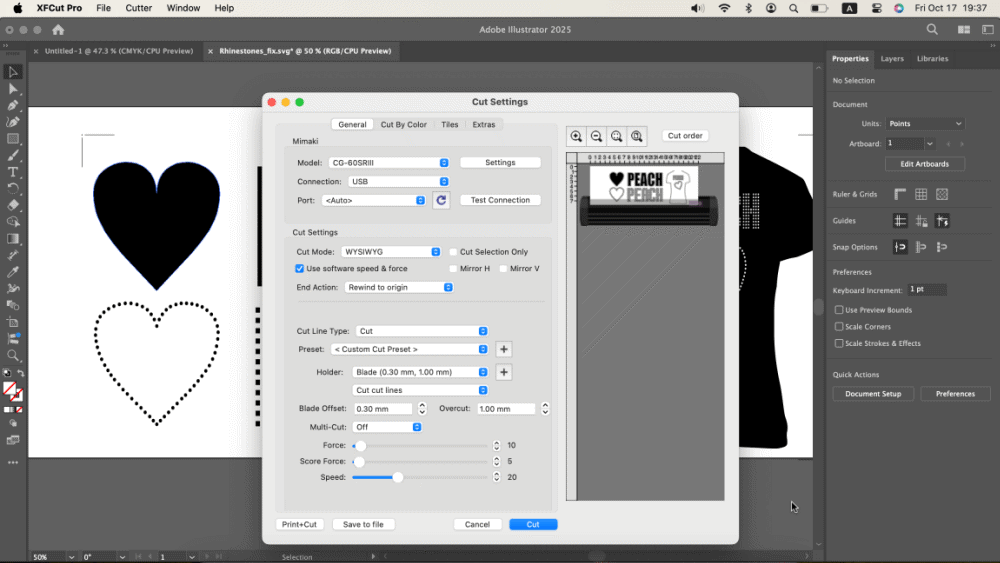
XFCut Pro is a professional vinyl cutting plug-in software created specifically for Adobe Illustrator. The software allows sign makers to edit images and create original graphic design in Adobe Illustrator and direct sends them to the vinyl cutting plotter. It works with Adobe Illustrator 2019, 2020, 2021, 2022, 2023, 2024, 2025, and Illustrator 2026.
The professional version supports some advanced features, including cut by color, cut multiple copies, tiles, contour cutting, control the cutting order, and extending the cutting length, etc.
Supports almost all common vinyl cutters and cutting plotters, including Roland, GCC, Secabo, Vevor, Mimaki, Graphtec, Vinyl Express, Saga, Refine, USCutter, UKCutter, Summa, Mutoh, Houston, PCUT, Mycut, Vicsign, Rabbit, DGI, E-Cut, Jinka, Desay Master, Yinghe, JiaChen, Liyu, Redail, Seiki, Signkey, ASC365, SkyCut, Pixmax, ROHS, Foison, Helo, KNK, Ioline, Artsign, BOYI, ANAgraph, PrismCut, PowerCut, Dika, Marsh, BDF, New Star, OmniSign Plus, VicSign, JiaChen, Yasen, KASA, JSI, TENETH, and more.

Be the first to leave a review for XFCut Pro for Mac
Write a ReviewThe top 5 features of XFCut Pro for Mac include:
XFCut Pro for Mac serves a wide range of businesses including Freelancers, Startups, SMEs, Agencies, Enterprises.
XFCut Pro for Mac is compatible with multiple platforms, Windows,Macintosh
The top three competitors of XFCut Pro for Mac are IFW Web Studio, DesignNbuy and BrandCrowd. To find the best fit for your business, compare and evaluate each platform's features, advantages, disadvantages, and other key aspects.
Yes, XFCut Pro for Mac offers a trial option, allowing you to test its features and functionality before committing. This trial access helps you assess how well the software meets your specific needs and ensures it’s a good fit for your business.